
The short version: OpenAI opened a business listing system for ChatGPT on November 10, 2026. You claim your practice, prove it is yours, verify your identity, then correct what ChatGPT shows. It takes six steps. Start the claim today, because OpenAI reviews each one and approval takes time.
Updated November 12, 2026, two days after launch.
On November 10, 2026, OpenAI opened ChatGPT Business Hub in beta. It lets you claim your business in ChatGPT, correct the details ChatGPT shows about it, and see how often ChatGPT mentions you.
It works like Google Business Profile. Prove the business is yours, then keep the details correct. If you have never claimed your Google Business Profile, do that too.
DO THIS NOW (the 5-minute start)
- Go to chatgpt.com/business-hub and search for your practice by name.
- Click your listing. Check that the address and phone are right.
- Start the claim and pick a way to verify: business phone, business email, or your website domain.
- Have your government ID and a phone nearby. You will need them for the identity check in Step 5.
- Stuck at any point? Book a free call with Health Biz Scale and we will walk you through it.
OpenAI reviews every claim, so start today.
The screenshots below walk through each stage using a sample practice. OpenAI's screens are new and may change, so follow the text if anything looks different. The steps come from OpenAI's help article, "Setting up your business on ChatGPT," as of November 12. I will update this page as the product changes.
Before you start
Have these ready:
- You must own the practice or be authorized to represent it. OpenAI will check.
- One way to prove it. OpenAI offers the business phone, the business email, your website domain, or Shopify. Whichever is offered for your listing, have it in reach.
- A ChatGPT account you will use to manage the listing. Use a work account you will keep, not a personal one you might close.
- A government-issued ID. OpenAI's help article says you may also need business registration information and proof you are authorized to represent the business.
Step 1: Open Business Hub
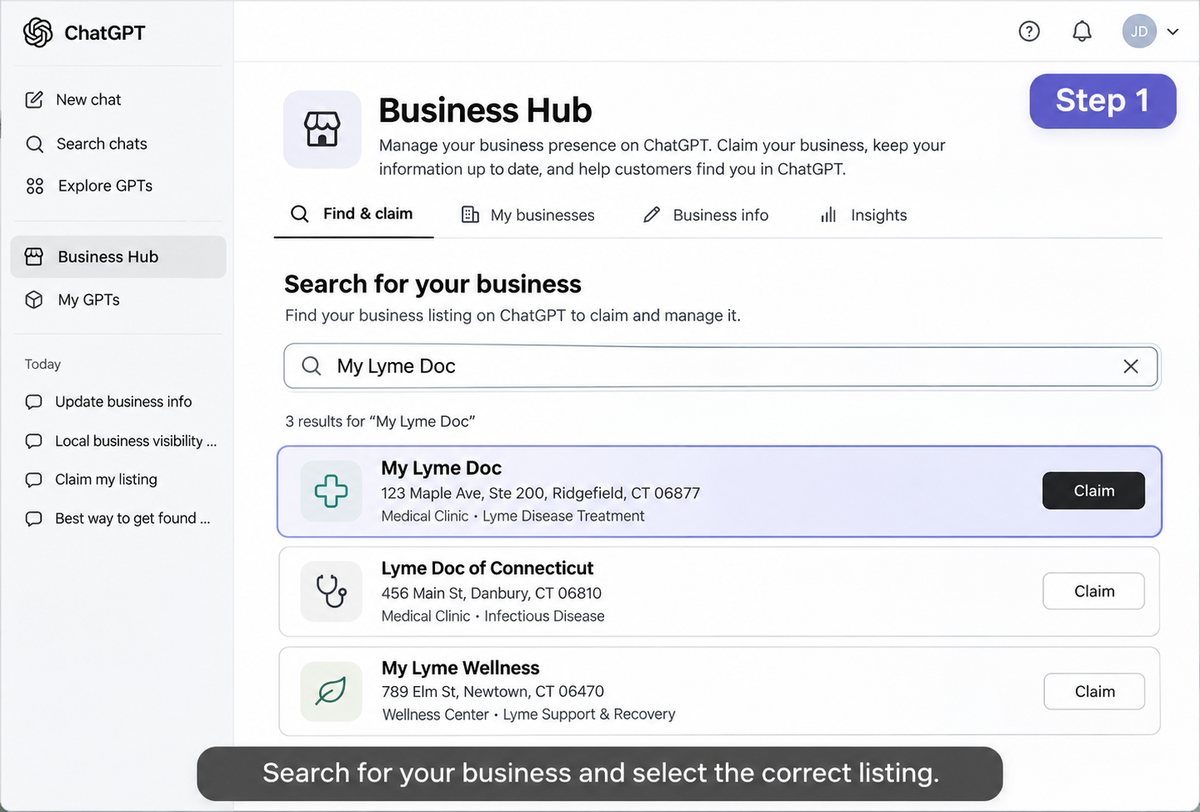
Sign in to ChatGPT at chatgpt.com, then open Business Hub from the left sidebar. You can also go straight to chatgpt.com/business-hub.
If you got an email invitation from OpenAI to claim your business, open the personal link in that email and sign in with the same email address that received it. Do not forward that link to anyone.
Step 2: Find your listing
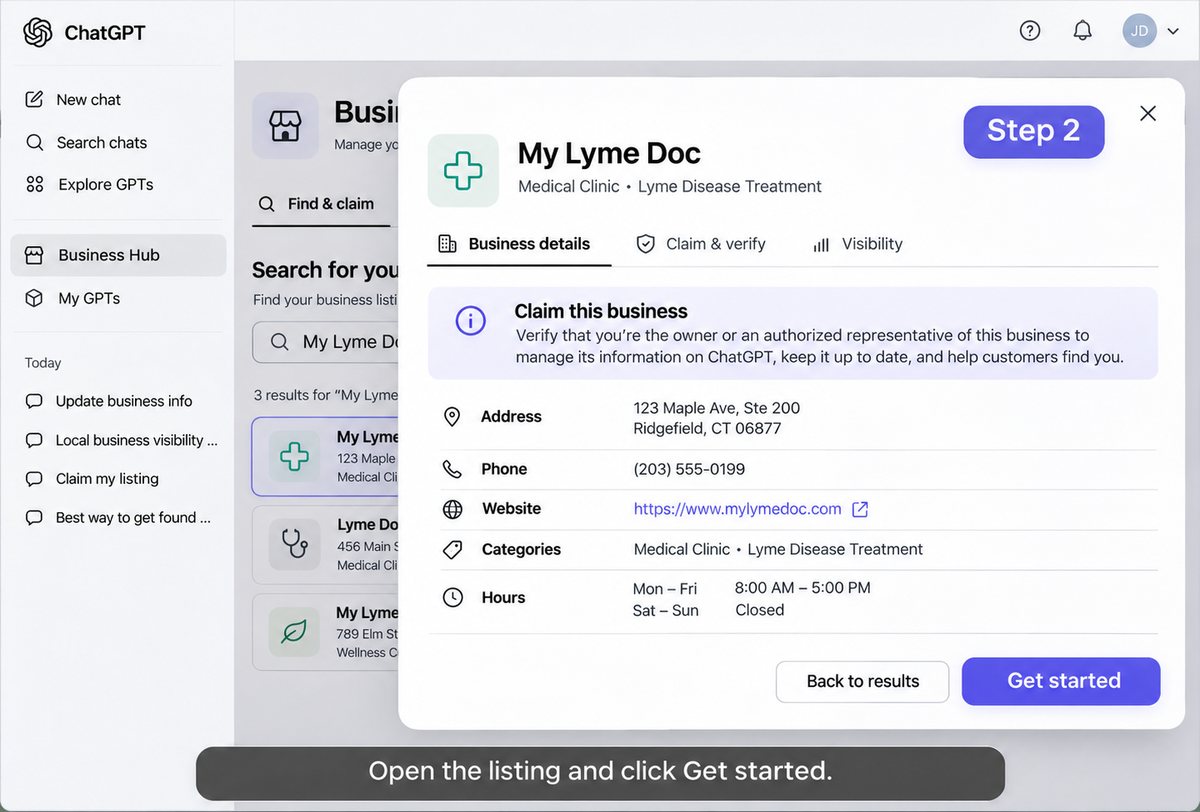
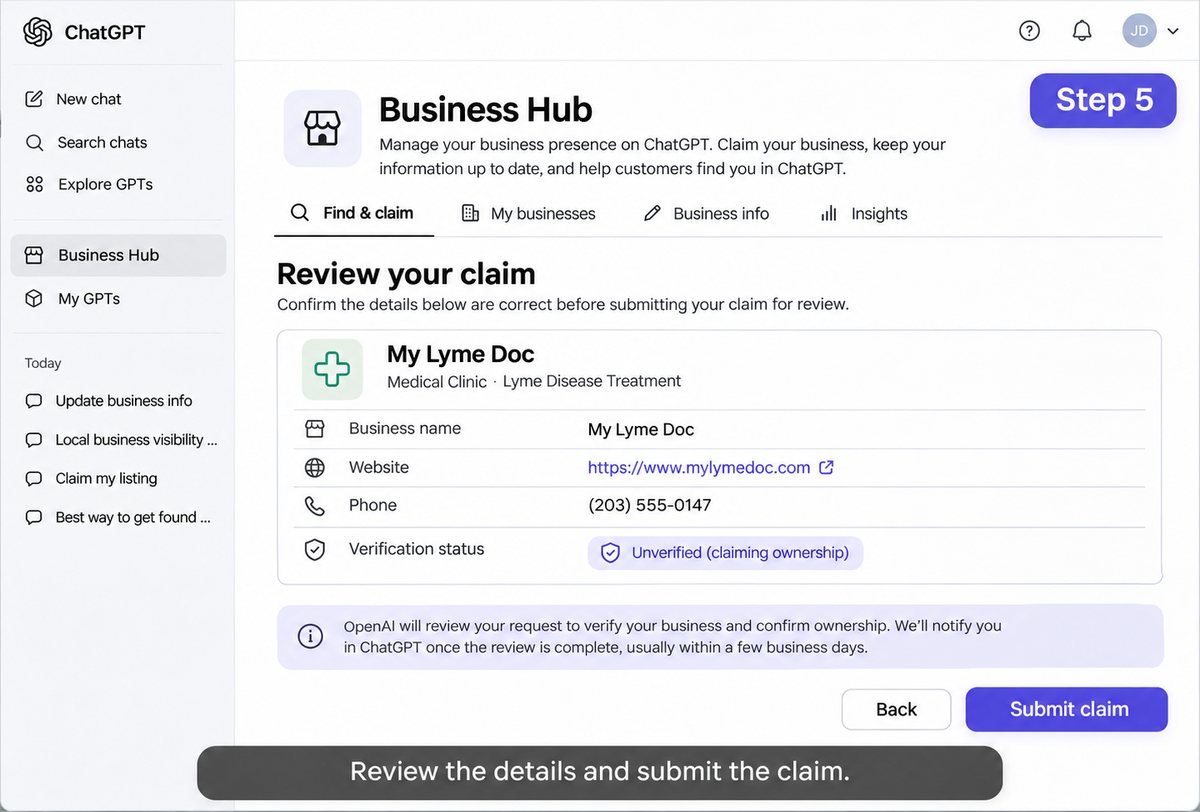
Search for your business by name and pick the listing that matches yours. Check the address and phone number before you click. Then confirm the ChatGPT account you will use to manage it.
Three things can happen here:
- You find it. Continue to Step 3.
- It says Contact support. The listing is locked. Select Contact support to request access.
- You cannot find it. OpenAI says online businesses may see an option to add theirs, and that local stores and restaurants can currently claim only an existing U.S. listing. OpenAI does not say how a medical practice is classified, so a missing listing may mean your type is not supported yet.
Step 3: Verify that it is yours
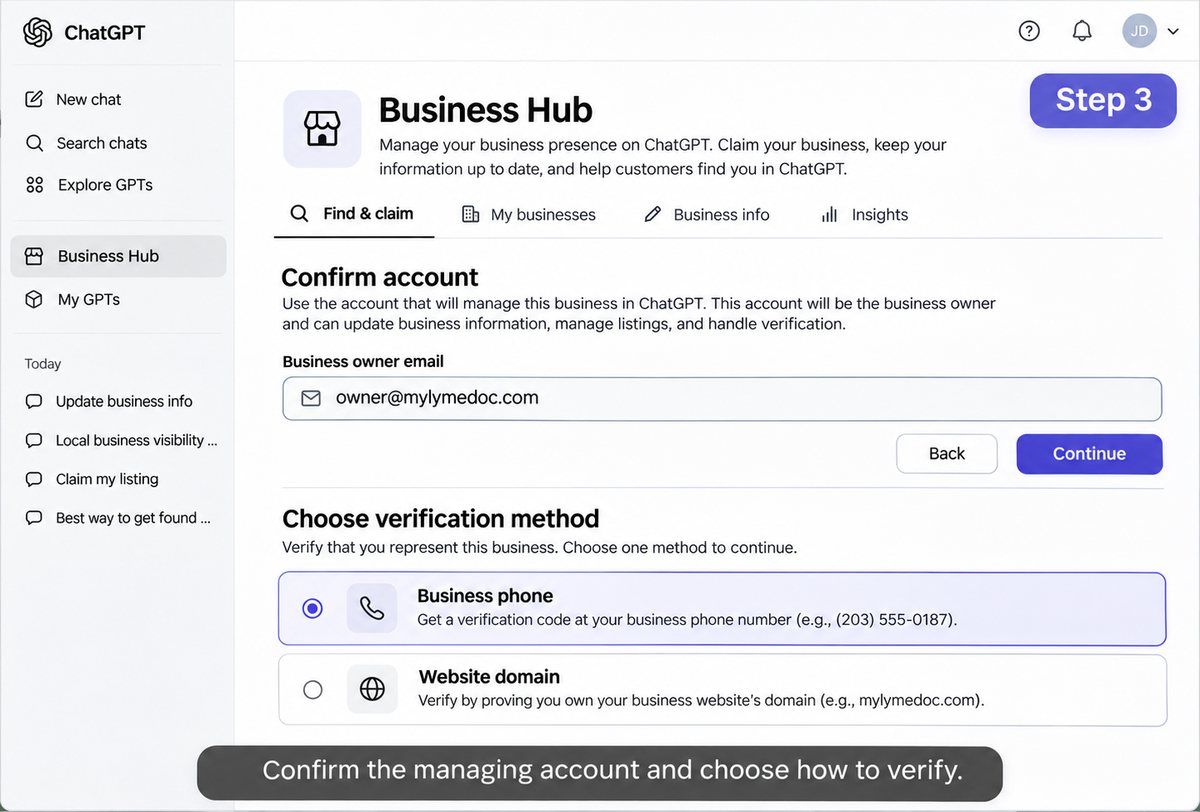
Choose one of the methods ChatGPT shows you. You will not see all four every time.
| Method | What you do |
|---|---|
| Business phone | Choose a text message or an automated call, select Get code, and enter the code sent to the number shown. |
| Business email | Select Get code and enter the code sent to the email address associated with your business. |
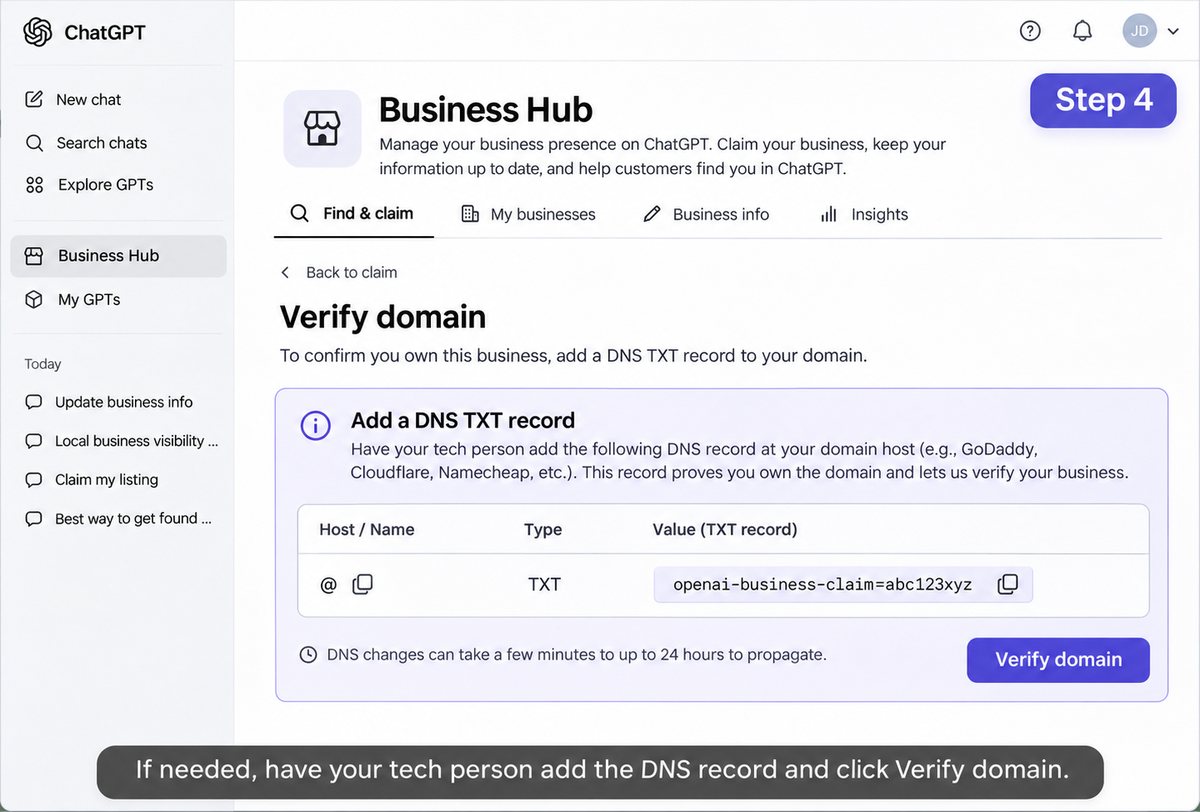
| Website domain | Add the TXT record ChatGPT shows you to your domain's DNS settings. Copy the type, the name or host, and the value exactly. Come back and select Verify domain. |
| Shopify | Select Connect Shopify, review the permissions, log in to the store for this business, and follow the prompts. |
DNS changes can take a while to show up. If someone else manages your domain, send them the exact record and ask them to add it. Copy and paste it, because the type, host, and value must match exactly.
Step 4: Wait for OpenAI to approve your claim
OpenAI reviews the claim and emails you its decision or a request for more information. While it is under review, you can cancel the claim. OpenAI does not publish a review time.
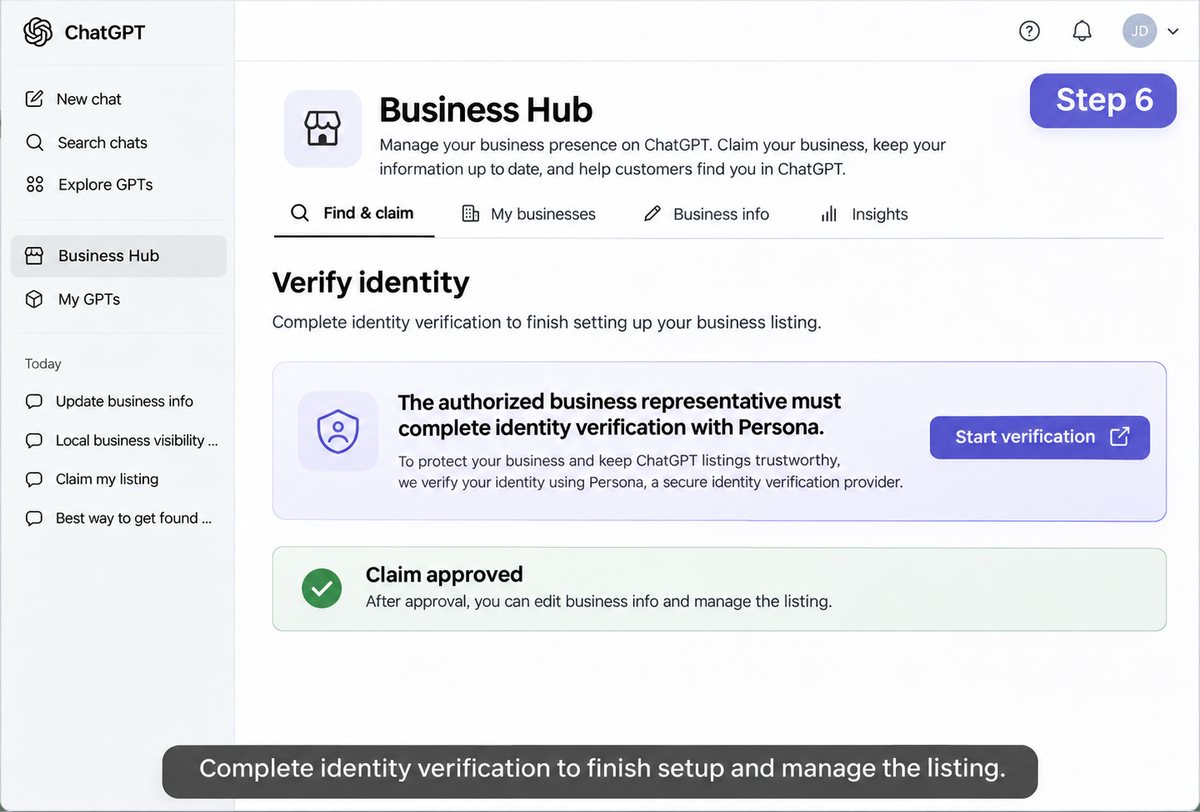
Step 5: Verify your identity
OpenAI asks you to prove you are a real person who can represent the practice. Until this is approved, you cannot publish changes to your business information, view insights, or create a business agent.
OpenAI uses a company called Persona for this. Here is what to expect:
- A government-issued ID. OpenAI's help article says you may also need business registration information and proof you are authorized to represent the business.
- A face check. OpenAI's help article does not describe this part. Early users on OpenAI's community forum, and creators who have been through the flow on video, report that Persona scans your ID and then asks for a selfie with a short left-and-right head turn. Do it somewhere with good light.
- Your name and details must match your official records. OpenAI says the business name, address, and any registration or tax number you enter should match your official business records. OpenAI lists a mismatch as something to check if a verification fails.
To start, select Verify with Persona, then Continue to Persona. If you claimed your listing first and skipped this, open the Business tab, select your profile, and select Verify.
Then wait. OpenAI reviews the submission and emails you its decision or a request for more information. You can cancel the submission while it is under review. If a check fails or expires, follow the instructions in the email and use Try again if it is offered.
Claiming alone does not give your profile the blue check. The verified badge appears after Persona approves you.
Need a hand with this step? Identity checks, DNS records, and locked or missing listings are the tricky parts. Book a call with Health Biz Scale and we will help you get through it.
Step 6: Fill in your profile
After both approvals, open your profile in the Business tab. OpenAI says you can update:
- your website
- your business description
- your product or service category
- your logo
- a cover photo and other optional details
- delivery and return policies, if they apply to you
OpenAI reviews and publishes your changes, and updates can take time to appear. Everything you add must follow OpenAI's Businesses in ChatGPT policy.
Step 7: Check your Insights
Open your business in Business Hub and select Insights. It shows the past 28 days:
- Mentions. For a local business, a mention counts when ChatGPT shows a result for your location, even if nobody opens the listing. For an online business, it counts when ChatGPT references your website.
- Website clicks. How often people click through to your site.
- Discovery topics. Common themes in ChatGPT answers that mentioned or cited you. These are not individual questions, and you never see anyone's conversations.
A blank number does not mean zero. OpenAI says it can mean the activity has not reached the reporting threshold yet, or the data is still being collected.
What claiming does not do
Claiming lets you manage the information you provide. OpenAI says it does not guarantee more visibility or give you control over what ChatGPT recommends. OpenAI also says ChatGPT may use other sources when it answers questions about your business.
So your listing is one source among several. ChatGPT builds its answer about your practice from your listing and from everything else it can find: your website, your Google Business Profile, directories, reviews, and articles. If those disagree about your address, your hours, or what you treat, claiming the profile fixes only one of them. Keeping them matching is called NAP consistency, and it is a core part of AI search optimization for medical practices.
To see what ChatGPT says about your practice today, run the test in our guide to ChatGPT SEO for practices, then read answer engine optimization for healthcare to fix what is wrong.
Frequently Asked Questions
Is it free to claim my business in ChatGPT?
OpenAI's help article says you do not need an ads account or a ChatGPT Enterprise agreement to claim an eligible business. It lists no claiming fee.
Can my practice claim a listing?
OpenAI says eligibility depends on factors including industry, location, and its verification and integrity checks. It does not name medical practices either way. The way to find out is to search for your practice in Business Hub.
Can I let my marketing agency or a teammate manage it?
Yes. OpenAI says the admin who claimed the business can add teammates in Business Hub and give an agency access. Each person uses their own ChatGPT account. Do not forward a personal claim invitation to give someone access.
I have several locations. Do I claim them together?
No. OpenAI says each brand is managed separately, central management across a parent company's brands and locations is not currently available, and claiming the main brand does not claim its locations.
Do I need to build a business agent?
No. Claiming, publishing an agent, and advertising are separate. Business agents are limited to eligible ecommerce and online service businesses in the U.S., so most practices will not see that option yet.
Can I delete a profile I made by mistake?
Only an unpublished draft. OpenAI Support cannot delete, unpublish, or hide a published profile, so continue only when you are ready to publish.
Where do I get help if something breaks?
Contact OpenAI Support. Include the step you were on, any error message, and a screenshot with private information removed.
Want it done for you?
If you would rather not spend an afternoon on identity checks and DNS records, book a strategy call with Health Biz Scale. We will help you claim and verify your listing, check what ChatGPT says about your practice today, and show you what to fix first.